These release notes detail the changes made in Serenity and StartSharp from version 10.6.0 to 10.6.2. For a complete list of changes, please refer to the Serenity Change Log.
The bulk of this document covers 10.6.1, a feature release with two big themes: icons (the framework drops the Font Awesome font in favor of SVG mask icons, and a new icon browser makes them easy to find) and localization (captions can be localized through explicit text keys instead of name inference). It also adds layout CSS / script bundles, generator and TypeScript tooling improvements, and a non-interactive mode for sergen.
10.6.2 is a packaging release: it only fixes a version mismatch in the common feature packages, so no application code changes are required for it.
A New Icon Browser
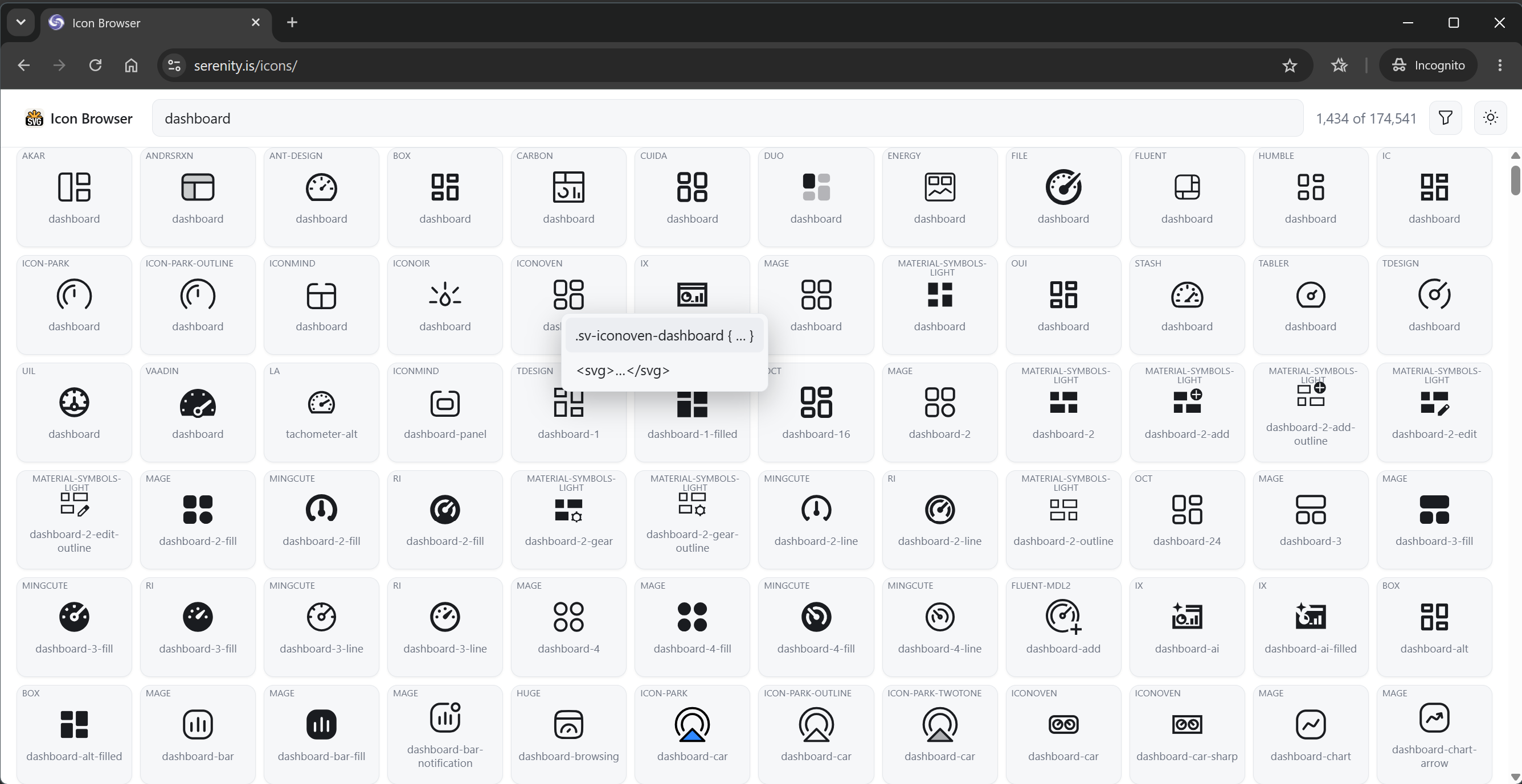
The new icon browser at https://serenity.is/icons lets you search roughly 175,000 icons from the Iconify packages and copy the markup for the new icon helper classes. The source is available at volkanceylan/icon-browser.
Type a search term and the grid shows matching icons from every bundled collection. Hovering an icon reveals the CSS rule that defines it (a .sv-<set>-<name> class whose --sv holds the SVG data URL) and the raw <svg> markup, so you can use either the helper class or the icon directly:
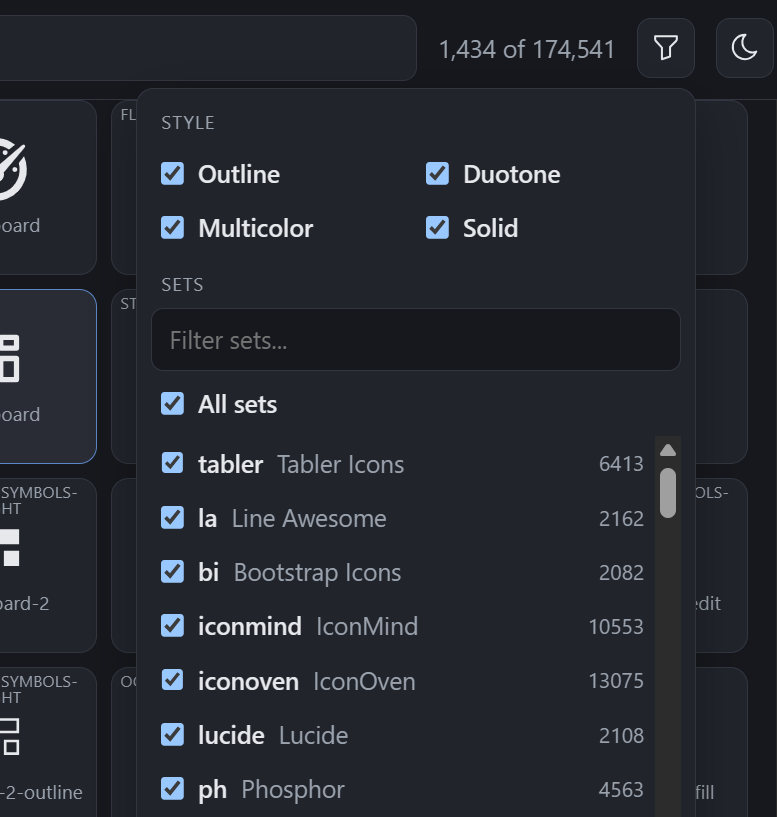
The filter panel narrows the results by style (Outline, Duotone, Multicolor, Solid) and by icon set (with per-set counts), so you can restrict the search to the families that suit your project:
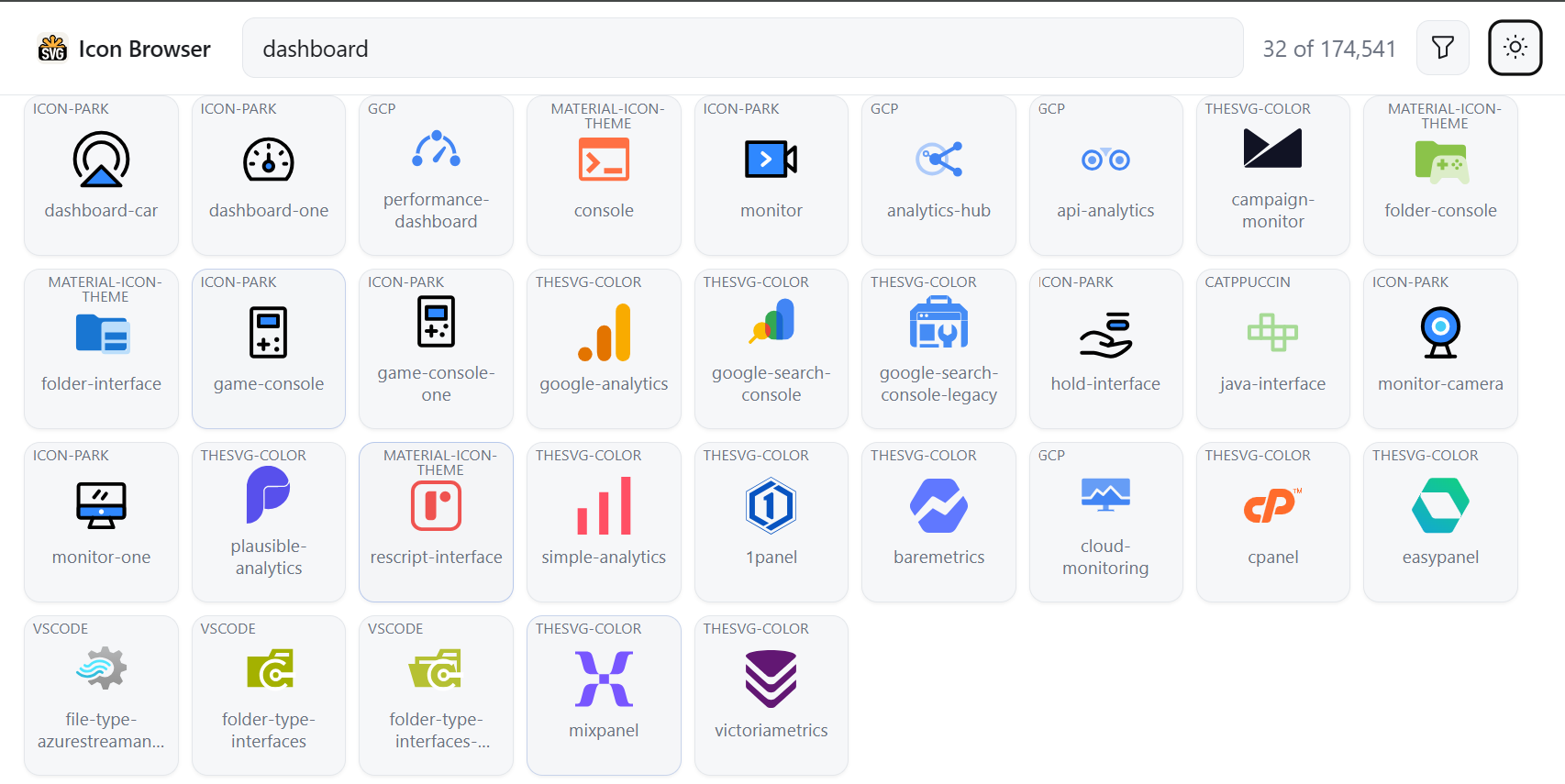
Multicolor and duotone sets render with their own colors, which is the reason the helper classes come in more than one flavor (see below). The browser also has a light / dark toggle that matches the docs site:
Icon Helper Classes
The stylesheets now define four reserved class prefixes. Each one consumes a --sv custom property pointing at an SVG (usually a data: URL), so an icon is just a class plus that property, and no font file is involved:
| Class prefix | Mode | Behavior |
|---|---|---|
sv-<name> |
Mask | Monotone icon that follows color / currentColor |
svbg-<name> |
Background | Keeps the SVG's own colors (palette / two-color icons) |
svcontent-<name> |
Content | Keeps the SVG's own colors, rendered at its intrinsic width / height |
svaccent-<name> |
Accent | Two stacked layers: the main layer follows text color, the accent layer keeps its own color |
.sv-dashboard { --sv: url("data:image/svg+xml,..."); }
.svbg-logo { --sv: url("/icons/logo.svg"); }

.svaccent-bell {
    --sv: url("...bell shape...");
    --svaccent: url("...dot shape...");
    --svaccent-color: #e5484d;
}
<i class="sv-dashboard"></i>
<i class="svbg-logo"></i>
The unprefixed sv, svbg, svcontent and svaccent classes are also defined, so you can combine a mode with your own class that only sets --sv (e.g. <i class="svbg my-icon"></i>). Things to keep in mind:
- Only the mask mode follows
color/currentColor; the other modes use the colors inside the SVG. - The content mode renders at the size declared in the SVG's
width/heightattributes, so it cannot be resized through CSS. - Use only one mode per element; the four prefixes are reserved.
- Theme-specific variants are up to you, e.g.
:root.dark .sv-dashboard { --sv: url("..."); }. - The accent mode is themed through
--sv,--svaccentand--svaccent-color.
Font Awesome Replacement (Breaking Change)
The Font Awesome icon font glyphs in the framework and StartSharp stylesheets are replaced by these mask icons. Each component now sets a --s-ico variable with a per-component fallback chain, for example:
.some-component::before {
    --s-ico: var(--s-icon-drag-helper, var(--s-icon-check-circle));
}
This makes it possible to override a single icon through CSS, without touching the component's markup:
:root {
    --s-icon-check-circle: var(--sv-some-check-svg);
}
Breaking change: stylesheets or scripts that override icons through the old font glyphs (content: "\f..." together with font-family / font-weight) no longer work. Set --s-ico (for a specific component) or the matching --s-icon-* variable instead.
Localized Captions with Explicit Text Keys
Serenity has always inferred local text keys from string values in attributes like DisplayName, Tab and Hint. That inference is convenient but implicit: a literal caption that happens to look like a dotted key is treated as a key, and the generated registration depends on the attribute and the string shape.
Two new mechanisms make this explicit:
DisplayText,CategoryNameandDescriptionTextattributes, which accept an explicitTextKeyand otherwise register the value as literal invariant text.TextKeysupport on theHint,Placeholder,TabandInstanceNameattributes.
[DisplayText("Movie Name"), Placeholder("Enter the movie name", TextKey = "Movie.MovieName.Placeholder")]
public string? Title { get; set; }
Related pieces:
- Local text registration honors
TextKeyfirst; otherwise it registers the value as literal invariant text. - The code generator emits
DisplayText(for exampleDisplayText(TextKey = "Db.Shared.RecordId")for the ID column) instead ofDisplayName. IImplicitLocalTextRegistrar/AddImplicitTextslet attributes register implicit text keys and defaults themselves, and the resolution logic is shared throughLocalText.ResolveFromAttribute.- Legacy
DisplayName/Description/Categoryattributes keep the old inference, so existing code is unaffected.
Breaking change: Tab, Hint, Placeholder and InstanceName no longer treat key-looking strings as local text keys. Set TextKey when you want a key, and use the plain value for literal text.
Field Public Names
Row fields can have a PropertyName that differs from their Name (e.g. a field mapped to a different column), and several call sites had their own PropertyName ?? Name logic. Field.PublicName now provides this value, and two unified lookup helpers handle the reverse direction:
FindFieldByPublicNameFindFieldByPropertyOrFieldName
Both are also available as IRow extension methods. Row serialization, SQL generation, request handlers, lookup / upload, projections, validation and dynamic script call sites were routed through them, so a field can no longer be found by one part of the framework and missed by another.
Layout CSS and Script Bundles
Dynamically loaded libraries can now ship their own CSS and script files without the application having to reference them explicitly:
[assembly: LayoutCssFile("~/MyFeature/lib.css")]
[assembly: LayoutScriptFile("~/MyFeature/lib.js")]
LayoutCssFileAttribute/LayoutScriptFileAttributeare discovered through the newILayoutCssFileProvider/ILayoutScriptFileProvider(with feature filtering, ordering and deduplication).Html.LayoutCssFiles()/Html.LayoutScriptFiles()render them: content-hashed individual links when bundling is off, or a single dynamic bundle per feature set when it is on.- They are exposed as the predefined
dynamic://CssBundle.LayoutCssFilesanddynamic://Bundle.LayoutScriptFilesbundles. - The concatenation and minification logic is shared through the extracted
ICssBundleBuilder/IScriptBundleBuilderinterfaces. - A new
IWebRootFileWatcherprovides shared file watching, used by the content hash cache and the layout bundles. CssBundlingOptions.ProcessImports/DedupImportsinline relative@importstatements in bundles, with cycle detection, url rewriting and per-file minification (StartSharp).
Why the Layout Head Matters
The declared files are meant to be rendered from the layout head, on every page, not from a page entry point. StartSharp's Views/Shared/_LayoutHead.cshtml does exactly that, right after the base style and script bundles:
@* Views/Shared/_LayoutHead.cshtml (StartSharp) *@
@Html.StyleBundle("Base" + rtl)
@Html.LayoutCssFiles()

@* ...meta tags, culture, local text... *@

@Html.ScriptBundle("Base")
@Html.LayoutScriptFiles()
This is what makes the icons usable in the navigation (sidebar, menu items, tabs): the layout shell and its navigation are rendered on every page, before the page's own ESM entry point is loaded. A page stylesheet is only applied when that page's module runs, so an icon declared there is not available to the navigation, and the menu shows an empty box until the page opens. Declaring the stylesheet through [assembly: LayoutCssFile(...)] puts it in the layout head instead:
[assembly: LayoutCssFile("~/MyFeature/navigation.css")]
The same applies to scripts that must be present before any page module runs. Html.LayoutCssFiles() / Html.LayoutScriptFiles() emit content-hashed links when bundling is off, or a single dynamic bundle per feature set when it is on, so the layout head stays short.
The attributes also support Order, RequireFeatures and RequireAnyFeature, so a feature's styles are only included when the feature is enabled (the predefined dynamic://CssBundle.LayoutCssFiles bundle is generated once and cached, so it does not follow feature toggles; use Html.LayoutCssFiles() where that matters).
Editor Improvements
Combobox and Lookup Editors
The combobox and lookup editors became more predictable around asynchronous selection loading and gained icon support:
Combobox.ensureSelectionLoaded()andselectionLoadState(also onComboboxEditor) resolve instead of racing the pending initial selection load. Waiters are rejected with anAbortErrorwhen the load is aborted or superseded, and the last failure is replayed.getSelectedItemAsync()/getSelectedItemsAsync()return the selected item(s) once the load completes.- The
changeevent raised bysetValueis marked with a dataset flag, so listeners can tell it apart from a user edit. - An optional
iconFieldrenders icons in Select2 results and selections; it can also be inferred fromIconClass/Icon. AbstractSelect2,SingleSelect2andMultiSelect2are exported, and the Select2 typings are tightened.- The search input is no longer autofocused on touch devices, and hardware keyboard input (Escape, Enter, arrows, printable characters) is routed to the open dropdown.
ServiceLookupEditor
- A single id produces an equality criteria instead of an
INlist. - An empty
idListreturns early without a service round trip.
getWindowLocation()
A new getWindowLocation() helper in corelib replaces direct window.location assignments in the built-in pages (login, sign-up, password actions, idle timeout, two-factor, external logins). Application code can adopt it so tests can replace the returned location object, since jsdom does not implement navigation.
Use getWindowLocation({ top: true }) where the redirect must break out of an iframe, as the service call 403 redirect does.
Grid Titles and Sidebar Icons (StartSharp)
DataGrid.getInitialTitle()/setTitle()no longer require a string; they acceptRenderableContentfor grid titles.- The active sidebar item's icon is shown next to the entity grid title, scoped to the main
#GridDivinsidesection.content.
Sergen in CI: Non-Interactive Mode
sergen g / --generate can now run without any prompts. --no-interactive (aliases --ni / --noninteractive) skips every prompt:
- Values with a default fall back to it.
- Values without one become required:
--table, and--connection-keywhen the project has several connections. Missing switches fail with a message naming the switch instead of blocking.
Existing files whose content would change are handled by the new --overwrite[:mode] switch:
| Mode | Behavior |
|---|---|
yes (default for a bare switch) |
Replace, keeping a *.bak copy |
no |
Fail with exit code 13 |
skip |
Leave the file alone and continue |
force |
Replace, without a backup |
Aliases: y / yes / true / backup for yes, n / no / false for no, s / skip for skip, f / force / overwrite for force.
Without the switch it stays interactive; in non-interactive mode it defaults to failing rather than silently discarding hand edits. A refused overwrite reports the new OverwriteRefused exit code (13) so scripts can detect it. --help can now be combined with a command, and generate has its own help text documenting the new switches.
Running Migrations Without Starting the Web Host
A new migrate command runs database migrations and exits, without starting the web server:
dotnet run -- migrate
HostMigrationExtensions.RunMigrationsIf(and a generic overload) returnsnullwhen the arguments are not a migrate command, and0/1/2for success / failure / extra arguments. Process termination stays with the caller.BaseDynamicDataGenerator.RunIfhas the same contract;RunAndExitIfis kept as an obsolete wrapper.IDataMigrationsis now shared underSerenity.Extensions, so Serene and StartSharp use a single definition.- Both templates'
Program.Mainreturn the resulting exit code, sodynamic-dataandmigrateinvocations report failures properly, andusing var hoststill disposes.
public static int Main(string[] args)
{
    if (new AppServices.DynamicDataGenerator().RunIf(args) is int dynamicDataExit)
        return dynamicDataExit;

    using var host = CreateHostBuilder(args).Build();

    if (host.RunMigrationsIf(args) is int migrateExit)
        return migrateExit;

    host.Run();
    return 0;
}
Breaking change: existing projects that copied IDataMigrations.cs into their own project must delete that copy and use the shared one, or dependency injection fails at runtime.
TypeScript Tooling
- The TypeScript parser port was updated to TypeScript 6.0.3, adding
defer/ import phase modifiers, ES2023–ES2025 targets, and import attribute / modifier fixes. - It also became cheaper:
SyntaxKindis stored asshort, node flags are packed into 12 bits, identifier text is materialized lazily, scanner keywords are looked up without allocating substrings, and AST parent pointers plus the unused incremental parsing code are gone. dts-bundle-generatoris replaced by the new in-repo@serenity-is/dtsbundler, which uses the workspace TypeScript 7 and native defaults. Bundled.d.tsfiles now use named imports forClassTypeInfo/EditorTypeInfo/FormatterTypeInfo/JSXElement/Columninstead of inlineimport("...")types (also in StartSharp).
Repository Tooling
- A new
pnpm cleanupscript removes only well-known regenerable folders (node_modules,.vs,obj,*.Web/bin,artifacts). It never follows symlinks or junctions, skips.git, supports--dry-run/--root, removes deepest targets first and falls back to a chmod pass for read-only files. It replaces StartSharp'sgit-clean.cmd, which also deleted untracked per-checkout files (Serenity, StartSharp). - StartSharp now inherits the shared pnpm catalog,
allowBuildsandoverridesfromSerenity/pnpm-workspace.yamlthrough a.pnpmfile.mjshook, keeping only StartSharp-specific entries local. The hook fails when aserenitycatalog entry is defined in both places. - Pro.Coder skips the expensive diagnostics scan in server typings by inspecting global usings directly when the project uses Serenity's global usings, and tracks unresolved Serenity attribute symbols so incomplete design-time compilations still block deletion of generated output (StartSharp).
xunit.v3was bumped to 4.0.2, withglobal.jsonselecting Microsoft.Testing.Platform and the CI test steps migrated to the MTP argument syntax. Preact was bumped to 11.0.2; class component refs are no longer forwarded, soMailboxLoginViewcaptures its root node with a ref callback (StartSharp).- Repositories renamed
NuGet.configtonuget.configfor case-sensitive file systems, and Linux builds includeSkiaSharp.NativeAssets.Linux.NoDependencies.
Obsolete Plugin Types
The legacy plugin system types (CSS / script files, navigation, service / background job and PrecompiledViews attributes) are marked obsolete in their documentation and point to the supported replacements: LayoutCssFile / LayoutScriptFile, NavigationLink / NavigationMenu, and dependency injection.
Bugfixes
- Generated TypeScript files now emit double-quoted module specifiers, matching the style used by server typings.
- Fixed the
Enums.ImageCheckResult.HeightTooLowtexts, which talked about width, and added the missingValidation.Int64message to the web locales. Punctuation in the default English service strings was cleaned up. UpdatableExtensionreportedOtherKeyinstead of theFilterFieldvalue in its error message; it now reports the filter field.- Require explicit permissions for dynamic scripts, pages and endpoints. A missing permission previously skipped the check entirely, so dynamic scripts without one were public; they now default to denied, pages and services to logged in, and an empty permission is treated as deny. Built-in bundles and scripts are marked
SpecialPermissionKeys.Public. Breaking change: useSpecialPermissionKeys.Public(*),SpecialPermissionKeys.LoggedIn(?) orSpecialPermissionKeys.Denyinstead of magic strings, and set a permission on dynamic scripts or pages that should stay accessible.
Package Updates
Notable package updates in 10.6.1:
- NuGet:
Markdig1.4.2,Oracle.ManagedDataAccess.Core23.26.400,PuppeteerSharp25.14.0,Microsoft.Extensions.*10.0.13,Microsoft.Build.*18.11.0, plus central transitive pinning. - npm:
tiptap3.32.0,vitest5.0.5,vite8.3.5,jsdom30.1.3,dompurify3.4.17,es-module-lexer3.0.4,chart.js4.6.1,fullcalendar7.1.3,datatables.net-bs53.1.4.
Upgrading to 10.6.2
Update NuGet packages to 10.6.2 (StartSharp samples reference
Serenity.*10.6.2).Icon overrides. Replace any CSS that relies on Font Awesome glyphs (
content: "\f..."plusfont-family/font-weight) with--s-icoor the matching--s-icon-*variable. The new icon classes are available immediately; the icon browser is the easiest way to find and copy them.Text keys. If you rely on key-looking strings passed to
Tab,Hint,PlaceholderorInstanceName, setTextKeyexplicitly. You can also migrateDisplayName/Description/Categoryattributes toDisplayText/DescriptionText/CategoryNameoptionally with an explicitTextKeyto drop the inference.Delete the local
IDataMigrations.csfrom your project and use the shared definition inSerenity.Extensions; otherwise DI fails at runtime. Make sureProgram.Mainreturns the exit code fromRunIf/RunMigrationsIfsomigrateanddynamic-datareport failures.Dynamic scripts and pages. Give every dynamic script and page an explicit permission. Scripts default to denied; pages and services default to logged in. Use
SpecialPermissionKeys.Public/LoggedIn/Denyrather than magic strings.CI scripts. If you generate code in CI, switch to
--no-interactivetogether with--table(and--connection-keywhen needed) and an explicit--overwritemode. Handle exit code 13 (OverwriteRefused) if you chooseno.Regenerate generated code (server typings, client types and row fields) so the new
DisplayTextemission and field public name handling are applied.Optional adoptions. Register
LayoutCssFile/LayoutScriptFilefor dynamically loaded libraries instead of adding their files to the layout by hand, and render them with@Html.LayoutCssFiles()/@Html.LayoutScriptFiles()in the layout head (as StartSharp's_LayoutHead.cshtmldoes), so their styles are available to the navigation on every page. Also usegetWindowLocation()in application code so tests can replace the location object.Tooling (StartSharp). Update the test projects for xunit.v3 4.0.2 / Microsoft.Testing.Platform, and check Preact 11 class component usages that relied on forwarded refs.